Quick verdict: Consider Semrush when someone on your team researches, edits and reviews pages each month. Still getting that routine in place? Start with Search Console. Judge the subscription by the website work the team actually completes.
Make the decision: Use the four-week evaluation plan to track what you research, what you ship and when to stop paying.
About this guide: Based on Semrush’s official documentation, not a paid-account test. We have set up Search Console for this site but have not tested Semrush’s interface, data quality or support.

Who should evaluate it?
A likely fit is a service business with several search landing pages and an editor who makes monthly updates. The current Semrush subscription guide lists an SEO plan with five websites to monitor and 500 keywords tracked daily; its SEO + AI Search Starter also lists five websites and 500 tracked keywords, with additional AI visibility features. These are published capacity limits, not a target to fill or a promise of ranking.
The plan line-up and account-specific price may change, so compare the live checkout before paying.
On a small screen, swipe the table sideways to see all columns.
| Situation | First action | When paid research may help | Stop or defer if… |
|---|---|---|---|
| New site, little search data | Verify Search Console, publish useful service pages | Recurring research questions remain after baseline | No owner can publish changes |
| Existing pages, unclear priorities | List customer questions and weak pages | Keyword and competitor research informs a specific update queue | Reports do not change the queue |
| Many pages with technical concerns | Check access and highest-impact failures | Site Audit helps assign fixable issues | Nobody owns remediation |
| Regular location or query monitoring | Name decisions and target market | Position Tracking serves a repeatable review | Tracking has no action tied to it |
What you can do before paying
Use Google Search Console for your own site’s query, landing page, indexing and click baseline. It is different from a third-party estimate of a competitor’s traffic. Record ten customer questions, the URLs that answer them and who can edit those pages. If the site has no meaningful pages yet, build them first. Our new-site keyword workflow shows how to examine real search results without relying only on a difficulty score.
Semrush’s Keyword Magic, Site Audit and Position Tracking describe different jobs: idea research, crawl-based issue discovery and monitoring selected rankings. A small team should choose the job it will repeat, rather than buy for the number of tools shown in a feature list. An audit may flag dozens of issues; deciding which ones matter to a real contact or service page is still human work.
Use keyword suggestions as a shortlist, then inspect the results
For a small service team, start with a buyer question rather than a broad product term. In Semrush Keyword Magic, enter a seed topic and select the target country database. Its documented volume, difficulty and intent fields can narrow a list, but they are modeled research signals. Open the live results for each finalist and check whether the result type matches the page you can make. A low difficulty number does not promise ranking.
Hypothetical example: A bookkeeping firm serving freelance designers could research “monthly bookkeeping checklist for designers.” It should first ask whether visitors want a handoff checklist, software advice or a bookkeeping provider. If the results favour checklists and the firm can supply a credible example, improve one relevant guide with the owner’s inputs and a clear enquiry step. If results mostly serve a different task, change the topic. This phrase has no claimed search volume or performance.
Use the low-competition keyword workflow for the manual SERP check, and compare the free and paid SEO routes before starting a subscription.
Plan and operating cost
Check whether the current SEO plan covers the work or whether AI search features of SEO + AI Search Starter are actually needed. Older SEO Toolkit Pro naming can mislead a new buyer; use the current subscription guide and checkout for product, billing cycle, regional currency, tax, limits, extra users, renewal and cancellation terms. We do not insert a fixed dollar subscription amount into this review.
The complete cost is subscription + research and review hours + time to make page changes. For illustration, an owner spending two hours per week for four weeks at an assumed $40 hourly cost invests $320 of staff time before the subscription. That is a planning assumption, not a measured Semrush result. If no page or fix ships, the loss is not only the fee; it is also those hours. If a useful update ships, assess its eventual enquiries and search visibility over time without attributing every change to one tool.
A four-week test with a decision at the end
Proposed experiment, not one we completed: assume a 12-page service site with one marketer and two hours a week available. The owner records actual tasks and time in a simple log. Choose one target country or service area so the research matches the audience.
- Week 1 — baseline: list existing service pages and 20 customer questions. Use Search Console where data exists. Pick three pages or questions that could plausibly change a buyer’s decision.
- Week 2 — research: use the selected plan’s keyword and competitor tools to shortlist five topics. Read the current search results and reject suggestions that have a different intent or no credible answer from your business.
- Week 3 — action: use Site Audit if technical concerns are relevant, but assign only issues with an owner and a reason they affect discoverability or use. Publish or improve at least one page; record the change.
- Week 4 — review: inspect the chosen queries and pages, log hours, what shipped and the next decision. Ranking changes over four weeks may be too early or noisy to prove a return; the immediate test is whether the workflow produced a useful action.
Keep it if you repeat the workflow and make useful decisions you couldn’t make with your free starting tools. Pause it if nothing goes live or you can’t point to a decision the reports changed. Upgrade only when a real limit blocks a task you already do. Buying more capacity for work nobody does is not much of an upgrade.
Worked example: turn a finding into a publishable change
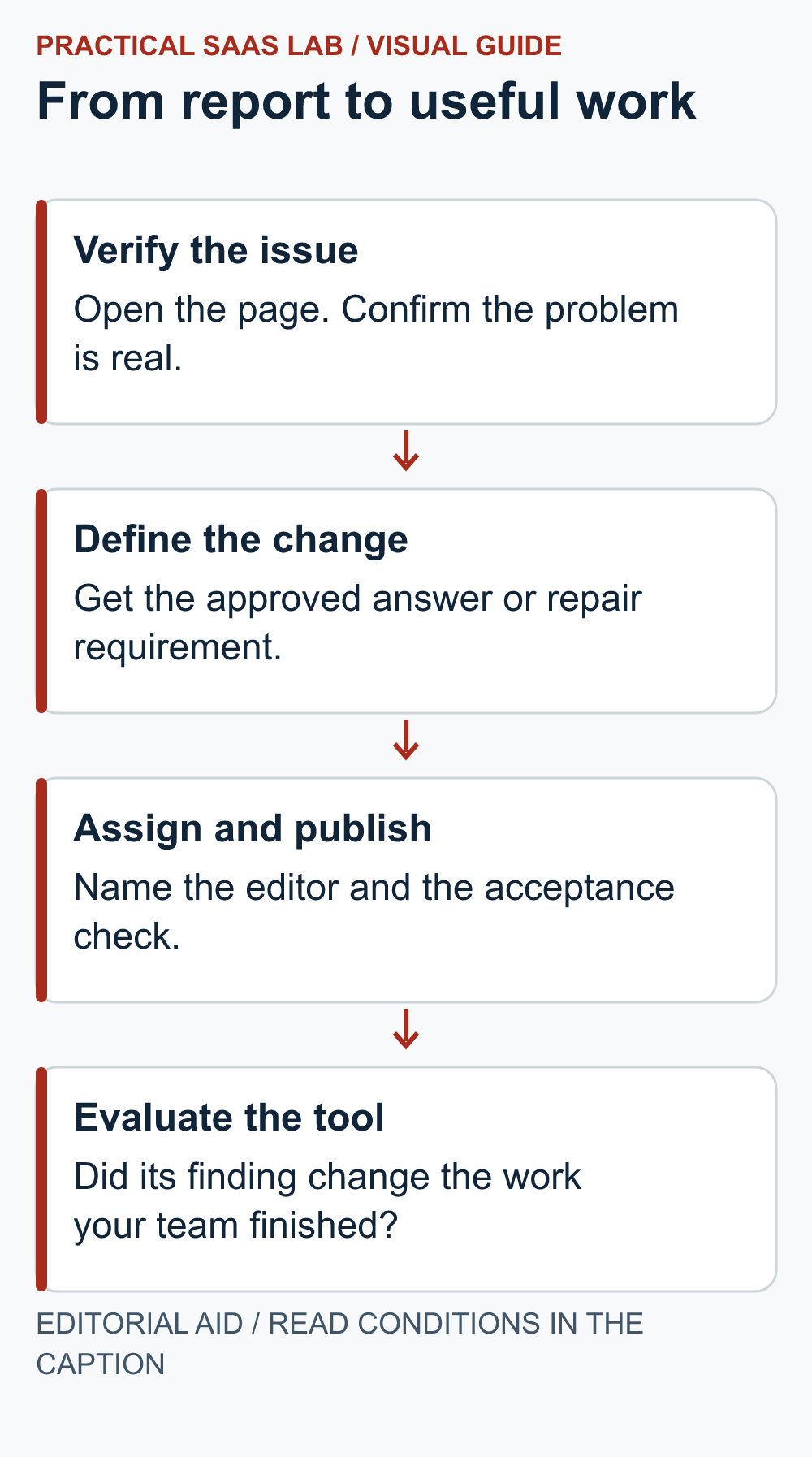
Illustrative editorial exercise: Suppose a site-checking report flags several issues and competitor research suggests a missing service topic. These are assumed inputs, not findings from our use of Semrush. The owner has two hours available this week.
- Verify before assigning: Open the affected page. If its enquiry link is actually broken, assign that repair first and test the destination after the fix. Do not prioritise by the largest warning count alone.
- Write the content decision: The service page does not explain whether an assessment includes a written report. Ask the service owner for the actual inclusion before drafting an answer.
- Make the handoff usable: Record the page URL, missing buyer question, approved answer, editor and acceptance check. “Optimise this page” is not an assignment a colleague can finish confidently.
- Accept the output: Confirm the approved answer is visible, fits the offer and leads to the correct enquiry route. Record publication separately from any later change in search or sales.
The purchase question is now specific: did the research find a useful task that your existing process missed, and could the team finish it within its time budget? If the owner never supplies the scope answer, another report will not unblock the page. Keep that delay in the evaluation instead of blaming or praising the software for work it cannot perform.
Strengths, limits and alternatives
From its published documentation, Semrush combines keyword research, site auditing, competitor insights and ranking monitoring. This can reduce switching between research screens for an active marketer. The counterweight is plan cost, learning time and the temptation to report metrics without improving a page. We have not independently tested usability, data freshness or customer support, so these are workflow considerations rather than product performance findings.
Next step: If competitor and link research is the central recurring job, compare Ahrefs; its plan limits differ. Search Console remains the baseline for your own Google Search data. Read our Semrush versus Ahrefs comparison and SEO tool decision guide.
After publishing: If a page seems absent from Google, follow the exact-URL indexing checklist. Do not read a zero-click period as proof of an indexing fault.
Useful detail: Record the match type with the keyword shortlist
Semrush’s Keyword Magic Tool offers Broad, Phrase, Exact and Related match modes that change the returned keyword ideas.
Two researchers can start with the same seed and get different shortlists because they used different modes. Keep the match mode with the export so a repeat review can explain what changed.
Try this:
- Use one relevant seed in the intended market.
- Compare Exact with a broader mode and inspect the actual returned wording.
- Record the seed, country and mode with the selected page idea; the setting is research context, not evidence that the page will rank.
Source: Semrush: Keyword Magic Tool manual. Checked October 3, 2026. The practical check is a PSL suggestion.
FAQ
Does Semrush guarantee more traffic?
No. Research and monitoring can inform work, but pages must answer real needs, remain accessible and be improved by a team.
Did we test a paid Semrush account for this article?
No. The plan and workflow analysis comes from cited official information. It should not be read as an interface or outcome test.
Should a newly launched site subscribe immediately?
Usually start with a site owner, a few useful pages and Search Console. Evaluate a paid tool when a repeated task and enough capacity to act on it become clear.
Primary sources: Semrush subscriptions and limits; current SEO and AI Search plans; Site Audit; Position Tracking; Search Console performance report. Checked September 26, 2026; verify the account-specific checkout and regional terms before purchase.