Quick answer: Start with Search Console to learn how your own pages appear in Google. Pay for competitor research, site checks or tracking only when a named person uses those findings to publish or fix something each month. If that work is not scheduled, keep the free route for now.
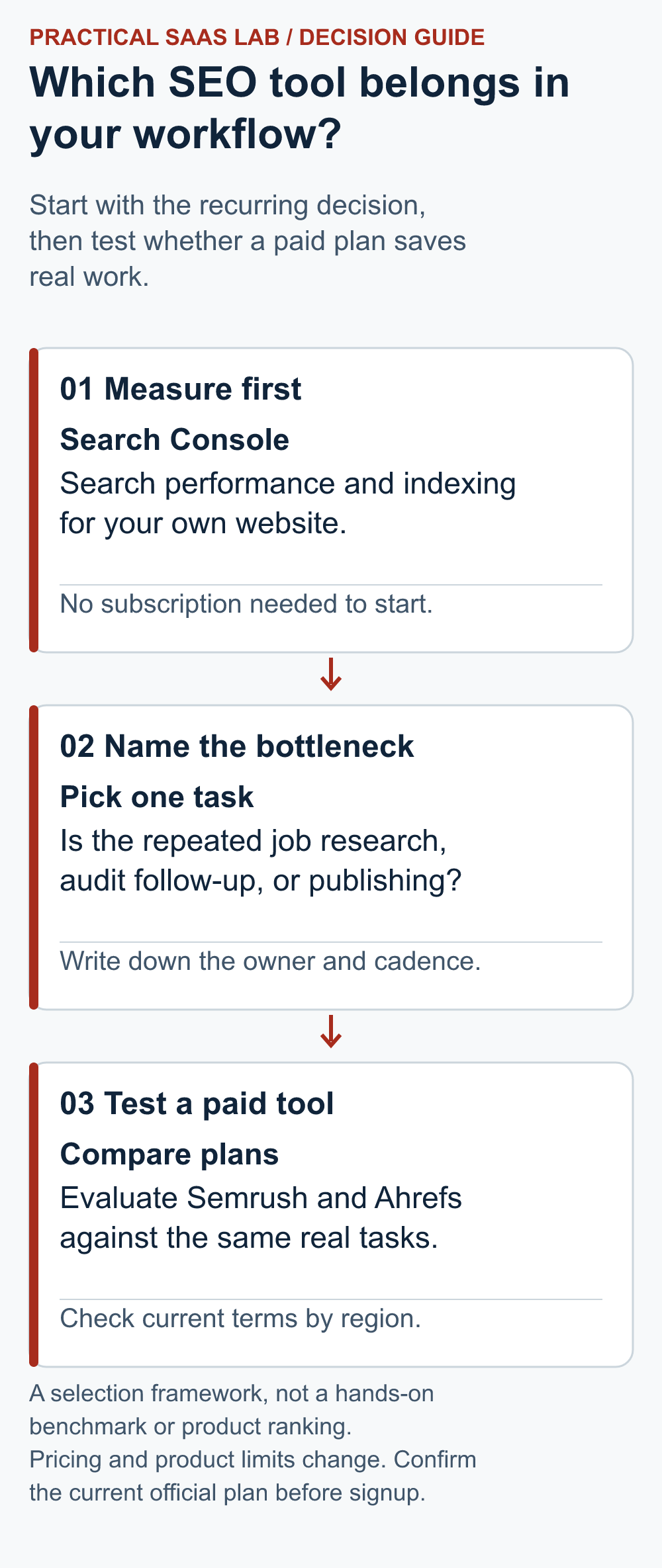
Start here: Try the four-week decision test. Use the comparison table and visual guide below to choose a shortlist, rather than buying the longest feature list.
About this guide: Based on documented features and our Search Console setup, not a paid-tool benchmark.

- The decision table
- Run a decision test before subscribing
- A completed decision record: buy, wait or change the workflow?
- Choose by the bottleneck you can remove
- Pricing and limitations
- Which route fits a low-competition keyword task?
- Recommendation
- Useful detail: Find question-led topics in the data you already have
- FAQ
The decision table
On a small screen, swipe the table sideways to see all columns.
| Tool | Good if | Skip if | First action |
|---|---|---|---|
| Google Search Console | Seeing the queries and pages that already appear in Google | You need detailed competitor research | Verify the property and export queries |
| Semrush SEO offerings | You regularly research, check your site and track positions | You only need an occasional report | Map three repeated SEO tasks to its plan limits |
| Ahrefs | You regularly research competitors, links and search terms | No one can act on the findings | Compare Starter and Lite limits against your workload |
Who should shortlist each option?
“Best” depends on the job you need done. These suggestions use documented features and the tasks a small team can finish. We have not ranked the tools in a hands-on test.
- New local-service site, no SEO owner: start with Search Console after ownership verification. Ask which service pages are indexed and which queries already appear. Defer paid research until someone can ship a page or fix each month. Reject this option if the job is to inspect competitors at scale, which Search Console does not provide.
- One editor plus an implementer with a weekly publishing and audit cycle: shortlist Semrush’s current SEO offering if research, tracking and technical checks each feed an assigned task. Verify projects, tracked queries, site-audit use and seats against the account’s actual plan. Reject the purchase if the editor only wants a one-off keyword export.
- Research-heavy consultant comparing competitors and links: shortlist Ahrefs and identify the exact reports needed. If the team also needs recurring tracking, exports or colleagues in the account, test Lite against Starter’s current restrictions. Reject the cheaper tier when one essential job exceeds its plan limit.
Before you buy: name three jobs you repeat, who will do them and which plan covers them. If no one can use the findings, keep the free option. The table and diagram are a guide, not test scores.
Run a decision test before subscribing
Try a paid tool against a real task. For example: “Every Tuesday, our marketing lead will find two customer questions, plan one page and assign one site fix.” If no one will do the next step, wait before subscribing.
Write the following on one page before opening a trial:
- One result that matters: enquiries for a named service or trial requests you can count. Search visits alone are not the goal.
- Three jobs you repeat: perhaps finding relevant questions, checking an existing page, and monitoring whether a fix changed visibility. Mark the person and time available for each job.
- Your starting point: record which pages Google has included in search, what Search Console shows, and how many useful pages you published last month. A new site may have little data. Write that down too.
- A four-week comparison: try the same jobs with Search Console and one paid candidate. Record what the candidate found, which finding led to an action, how long that action took, and whether the team completed it. Do not use modeled traffic or a tool’s difficulty score as a sales forecast.
At the end of four weeks, look at the work, not just the reports. Did you publish a page or fix a real site problem because of what you found? Was that worth the subscription and learning time? If you only collected a longer keyword list, stick with Search Console for now. More research is useful only when you have a next step for it.
A setup lesson from this site
Before this site launched, we verified ownership in Google Search Console using a DNS TXT record. The site then had no published articles and was set to noindex, so there was no search data to report. If your report is empty, first check whether Google can include your pages in search.
We have not tested paid Semrush and Ahrefs accounts against each other for this site. Our suggestions use their documented features and the jobs a small team can complete.
A completed decision record: buy, wait or change the workflow?
Hypothetical example, not a tool test: A local service firm has one editor and two hours a week for SEO. Its proposed purchase must help the editor choose and complete a useful page change. The owner records these four-week outcomes:
- Question: Which service question should our next page answer?
- Existing route: Customer enquiries and Search Console identify two missing explanations. Both can be addressed without a paid subscription.
- Candidate contribution: The hypothetical paid research produces 30 additional ideas, but none changes the two-page queue.
- Work completed: One service explanation is revised; the second waits for the owner’s scope approval.
- Decision: Defer the subscription. The current constraint is approval time, not a shortage of topics.
- Reopen when: The editor has a recurring competitor question the existing route cannot answer, plus time to act on the result.
If the candidate instead reveals a relevant gap that changes the brief, record the source, the resulting page decision and the time needed to implement it. That supports a workflow judgement; it still does not establish increased enquiries. A keyword list is an input. It does not get promoted to a business result just because it has more rows.
Choose by the bottleneck you can remove
No clear offer or useful service pages: improve those pages first. A larger keyword list does not make the offer clearer. Use customer questions and Search Console as your starting evidence.
Pages are being published but the team lacks competitor context: test one paid candidate against a real brief. Record the finding that changed the page, the person who made the change and the time it took.
Several services or locations need recurring checks: trial the exact projects, tracked terms and reports you will use each month. Buy only if the work continues after the trial.
Pricing and limitations
Compare the current offer for your account, not a plan name alone. Semrush’s SEO Toolkit help and SEO / SEO + AI Search pricing pages describe different packaging. Ahrefs limits also depend on the plan. Check projects, report credits, tracked terms, seats, exports and renewal terms against your three recurring jobs.
Currency, tax, region and billing cycle can change the checkout total. Include the time to learn and act on the tool. Neither a difficulty score nor a modeled traffic number is a forecast of enquiries.
Which route fits a low-competition keyword task?
Free first: List real customer questions, inspect your own Search Console queries where available, and manually review the live results for one promising phrase. Search Console reports your site’s appearances; it does not expose a complete competitor keyword database. Follow the low-competition keyword workflow to choose one page to improve.
To assign each question to a page, use the keyword-to-page mapping guide and free XLSX worksheet. Check the example, then enter your own verified URLs.
Paid when the work repeats: If an editor regularly needs broader suggestions and competitor context, evaluate Semrush against the exact research, editing and review tasks. Read the source-based Semrush evaluation and check current plan limits on the vendor site before paying. Treat keyword difficulty and estimated traffic as screening aids, not guarantees.
After the edit: Confirm the public URL and use the indexing checklist if the page is not showing. Then review the page and query data over a complete period; a new page needs time and a zero-click snapshot alone gives no diagnosis.
Recommendation
Set up Search Console first. If a paid tool is still needed, use the four-week test above and compare Semrush vs Ahrefs for a closer shortlist. See Semrush alternatives when one specific task remains unsolved.
Useful detail: Find question-led topics in the data you already have
Search Console supports RE2 query filters with start-of-string anchors.
Before buying another research tool, try a small question-led view of your site’s visible queries. Wording is a clue to the reader’s task, not proof that every matching phrase needs a new article.
Try this:
- Try ^(how|what|when|why) followed by a space in a query regex filter.
- Inspect the actual questions and the pages already receiving impressions.
- Choose one answer you can improve with relevant evidence, and record the baseline and review date before editing it.
Source: Google Search Console: advanced filtering. Checked October 3, 2026. The practical check is a PSL suggestion.
FAQ
Does “SaaS SEO tools” mean tools for a SaaS business?
The phrase can refer to subscription-based SEO software, or to software chosen for marketing a SaaS product. This guide covers how a small business chooses an SEO workflow; it does not benchmark tools for SaaS acquisition. If you sell a SaaS product, first name the audience and the page decision you need to improve, such as a use-case page or a product comparison. Then test whether a candidate changes that decision. A larger keyword database by itself does not demonstrate trial sign-ups or sales.
Is free Search Console enough for a new site?
It is enough to observe your own Google search performance and investigate indexing. It cannot provide a full view of competitors’ keywords or backlinks.
Should I buy the least expensive SEO plan?
Only if its report credits, projects and tracked keywords cover the work you will actually do. Compare limits before the displayed monthly price.
Sources: Google Search Console performance; Semrush current SEO plans; Ahrefs pricing.
Information checked: September 23, 2026. Recheck prices and plan limits before purchase.
Next step: Put a 30-minute weekly review on the calendar with one owner. Use our Search Console review guide to turn one observed query or page issue into an assigned edit.