Quick choice: Webflow is a candidate when a design owner wants managed hosting. Self-hosted WordPress is a candidate when your team wants to choose its hosting and add-ons—and someone will maintain them. Before comparing templates, ask who will fix the site when something stops working. Name the person responsible for updates, recovery and routine edits.
- Compare the five decisions that matter.
- Try the three-year cost example using your own fees and staff time. Figures are illustrative, not vendor quotes.
About this comparison: Based on official documentation and our own WordPress edits; we have not run an equivalent Webflow test.
- The five questions that settle the choice
- Consider the migration before building
- Pricing without a false comparison
- Rehearse the change you will make monthly
- PSL test: a draft edit in our existing WordPress setup
- Fit and friction
- Recommendation
- Useful detail: Compare the handover package on both platforms
- FAQ
The five questions that settle the choice
On smaller screens, scroll the table horizontally to compare all three columns.
| Question | Favors Webflow when… | Favors WordPress when… |
|---|---|---|
| Who edits layouts? | A design owner needs precise visual control | Templates and plugins meet the need |
| Who handles maintenance? | The team wants a managed platform | An operator or agency owns updates and backups |
| What repeats? | Reusable blog or case-study pages fit Premium | Your team needs flexible add-ons for several page types |
| What if we move later? | You can accept work if you leave later | You want to choose the host and site tools |
| What is the budget? | A predictable site plan fits | You budget hosting, add-ons and staff time |
Consider the migration before building
Before you move away from Webflow: a paid Workspace plan is needed to export site code. A paid Site plan alone does not include that export. The exported files do not contain the working CMS (the system used to edit repeatable pages), and forms will not collect messages. Export the page data separately and set up a new form.
WordPress can export posts and pages, but moving a whole site also needs a database and file backup. Test themes, add-ons, redirects and forms after the move. See Webflow’s export guide and WordPress’s migration guide.
Pricing without a false comparison
Webflow charges separately for a Site plan and, where needed, a Workspace plan. A custom domain needs a paid Site plan. Basic is for sites without repeatable blog or case-study pages; Premium supports those pages. If you need code export or certain team features, check whether a paid Workspace adds cost.
WordPress.org software has no license price. Add hosting, paid add-ons, backups, security work and staff time. Webflow’s changed plans may affect existing accounts at different renewal dates, so use the current offer for your account.
Region check: Pricing, currency, taxes, plan availability and trial terms may differ in the US, UK, Canada and Australia. Confirm the offer and terms displayed for your location on the official site before subscribing.
Compare three years of the same work: setup, domain and hosting or Site plan, team access or paid add-ons, forms, backups, monthly editing and a possible move. Total = setup + 36 months of fees + upkeep and editing hours × your actual hourly cost. This is a worksheet, not a vendor quote.
Rehearse the change you will make monthly
Try the same short service page in each platform, including a contact route, an answer to a real customer question and a case study. Then let the future editor change a service price, replace a testimonial with permission, update the navigation and test the form on a phone. Note the time and any outside help needed. That tells you more about everyday ownership than watching someone else give a perfect demo.
If booking is the main action: Use the same real appointment type on both routes. Test a blocked slot, booking, reschedule and cancellation on a phone, then confirm who receives the customer message and who fixes a missed notification. Budget the scheduling tool and the person who maintains it. If the job needs a scope check before a time can be promised, start with an enquiry form or qualification step instead.
If you publish case studies often, build one using the information and permissions you actually have. If the site has only a few stable pages, try a simple page first. Our static pages vs Webflow Collections guide helps decide whether a CMS is needed at all. In either case, test where form messages arrive and name who handles spam, backups and renewals.
Worked example: a three-year cost sheet
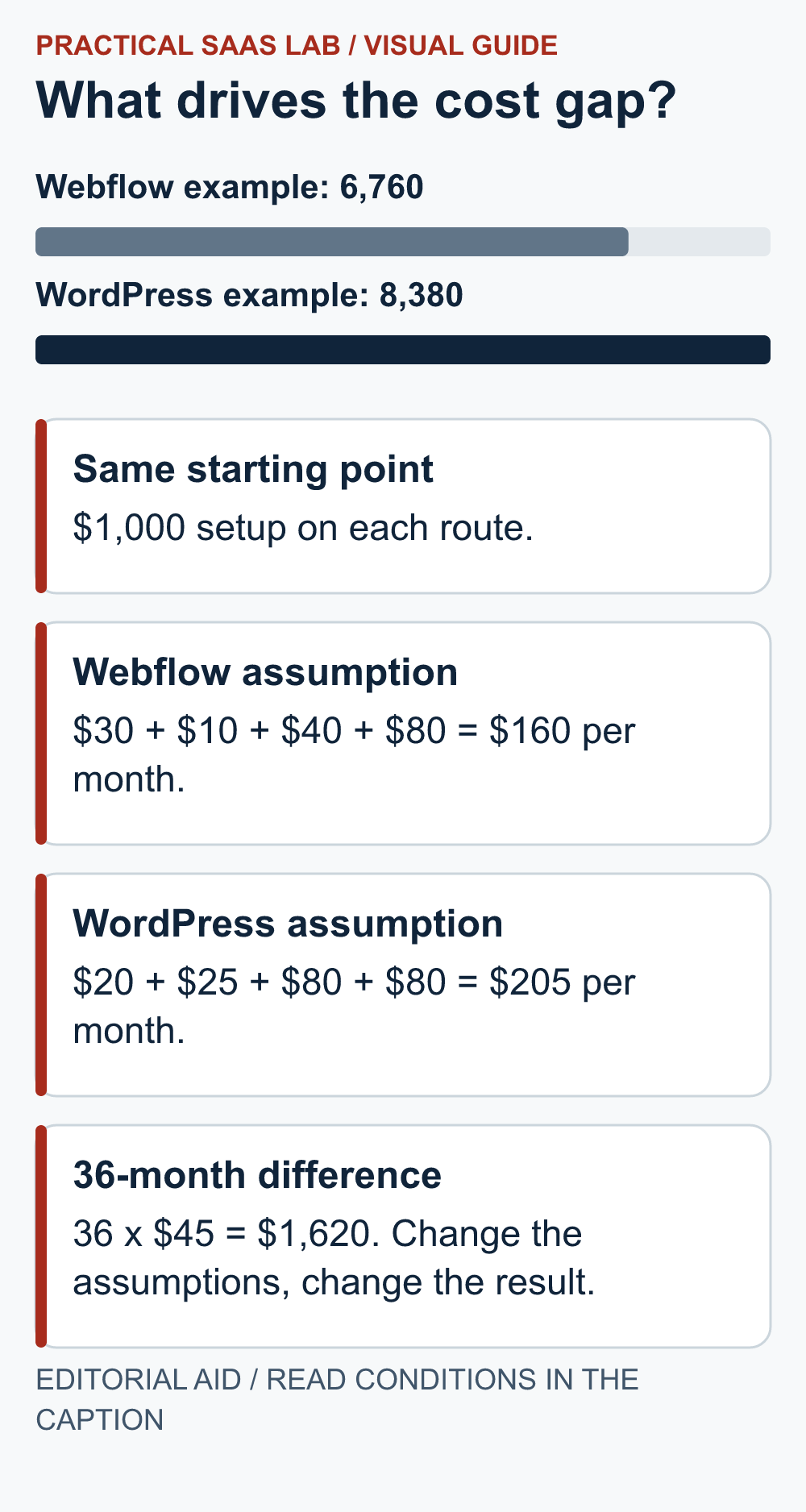
Illustrative assumptions only, not vendor quotes or measured labor: one five-page service site, one editor, 36 months and a planning rate of $40 per staff hour. Enter the live checkout price, renewal term and your own labor estimate before using this for a purchase.
On smaller screens, scroll the table horizontally to compare all three columns.
| Input for this example | Webflow route | Self-hosted WordPress route |
|---|---|---|
| One-time setup | $1,000 | $1,000 |
| Site plan or hosting / month | $30 assumed | $20 assumed |
| Workspace, paid add-ons, plugins and backup / month | $10 assumed | $25 assumed |
| Technical upkeep / month | 1 hour × $40 = $40 | 2 hours × $40 = $80 |
| Routine content edits / month | 2 hours × $40 = $80 | 2 hours × $40 = $80 |
| Illustrative three-year total | $1,000 + 36 × $160 = $6,760 | $1,000 + 36 × $205 = $8,380 |
The $1,620 gap is produced by these assumptions, chiefly the extra upkeep hour and add-on estimate; it is not evidence that Webflow is cheaper. Replace every input, including taxes, annual versus monthly billing, renewal changes, domain, form delivery and a future migration. Different time spent editing can reverse the outcome.
What we actually checked on WordPress
During Practical SaaS Lab’s prelaunch setup on a separate self-hosted WordPress installation, we edited a comparison table, saved the article as a draft and checked a narrow 320px front-end preview. The table needed its own horizontal scroll wrapper, and the desktop layout needed a container-width CSS correction.
That is direct evidence that a seemingly small content change can create an extra layout task for the site owner. It is not a timed benchmark or a Webflow test. We have not repeated the same edit on a Webflow site, so this observation cannot decide which platform is faster for another team.
PSL test: a draft edit in our existing WordPress setup
Hands-on check: October 4, 2026. In our existing WordPress 7.1.2 installation, the native block editor initially opened in code mode; we switched to visual mode. We made a temporary post with a title, two paragraphs, one H2 and a native two-column, three-row table. We saved the draft, reloaded it and previewed it on desktop and at a 390px viewport. The text and table persisted; at 390px, both table columns were visible without observed horizontal clipping.
The browser automation/operator workflow took 5 minutes 55 seconds from opening the editor to moving the test draft to the recoverable Trash, including editing, saving, reloading, previews and cleanup. This is neither a beginner’s time nor whole-site building time. We did not run the same task in Webflow, so this does not support a speed comparison.
Fit and friction
Webflow combines visual design with managed hosting, but its plan limits and future moving work matter. WordPress gives you a choice of host and add-ons, but someone must handle updates, conflicts, backups and security. We have not measured which platform is faster or performs better in search for your site.
Recommendation
Make a sample service page, case study and lead form in each shortlist option. Time a routine edit and a backup or export exercise. Select the platform the actual owner can maintain. See the builder overview for other routes, then check Webflow’s current plans against your requirements before paying.
Next step: If self-hosted WordPress is your choice, use our WordPress hosting checklist for a small service business to compare renewal costs, backup restores and maintenance ownership before buying a plan.
Useful detail: Compare the handover package on both platforms
WordPress WXR content exports do not contain attachment files or site configuration options.
In the Webflow-versus-WordPress decision, compare the actual deliverables needed for the next operator. “Export supported” is too broad to estimate migration effort.
Try this:
- Ask each route for one content record, its media and the surrounding presentation.
- Identify what is included, referenced or must be rebuilt.
- Put the remaining operator hours in the cost sheet before judging the exit route cheaper.
Source: WordPress: WXR export limitations. Checked October 3, 2026. The practical check is a PSL suggestion.
FAQ
Is WordPress or Webflow better for a small business?
Choose by the person who will keep the site working. Shortlist Webflow when a design owner wants managed hosting and its plan covers the content you publish. Shortlist self-hosted WordPress when you need a choice of host and add-ons and can name an operator for updates, backups and recovery. If nobody owns that work, arrange maintenance before choosing either route. Use the five-question comparison to record the decision.
Is WordPress cheaper than Webflow?
A lower software or hosting price does not settle the comparison. Add setup, 36 months of plans or hosting, paid add-ons, routine edits, maintenance and a possible move. Replace the assumptions in the three-year cost worksheet with your own quotes and staff time. Its example totals are invented planning figures, not current vendor prices or proof that one platform costs less.
Is WordPress.org the same as WordPress.com?
No. This article compares self-hosted WordPress.org software with Webflow. Hosted WordPress.com plans have a different commercial and maintenance model.
Does Webflow Basic support a dynamic blog?
The official guide says Basic is for sites without repeatable blog or case-study pages. Check Premium if you need those pages.
Sources: Webflow Site plan guide; Webflow pricing change; Webflow pricing FAQ; WordPress.org About.
Official plan and export information rechecked: September 26, 2026. Recheck prices and region-specific terms at checkout.