Quick answer: Seven days is a planning target for a small service site with one approver, ready assets and a simple contact route. Launch when the service claims are approved, the public pages work on a phone, and a test enquiry reaches a named person. If any of those fail, move the date or reduce scope.
Start here: Jump to the launch-blocking checks. Use the day-by-day table below to assign an owner and a pass condition.
Disclosure and evidence: This is a proposed launch plan, not a guarantee of completion or search traffic. Practical SaaS Lab’s own WordPress editing and Search Console setup inform the checks; the day-by-day example below is not a client launch we completed.
Agree the offer, page map and evidence you can publish.
Choose the maintainer’s platform and create the essential pages.
Test enquiries and mobile pages, approve, then verify the public site.

- Before day one: set the scope
- Days 1–2: make the message testable
- Day 3: choose the platform by maintenance
- Days 4–5: publishable content, not filler
- When day two slips: reduce scope or move the date?
- Day 6: prove the customer can reach you
- Day 7: publish and verify the public pages
- Useful detail: Do not hide a launch preview by only blocking crawling
- FAQ
Before day one: set the scope
Name the owner for copy approval, domain access, form enquiries and post-launch updates. Collect the logo, service details, contact destination and only the photos or testimonials you have permission to publish. Decide whether the first version needs a blog, CMS case studies, bookings or payment; those choices affect the platform and schedule. If the publishing need is unclear, use our static pages vs CMS decision guide to inventory fixed pages and repeatable entries before selecting a plan. If you cannot name who approves claims or receives enquiries, do that before paying for a builder.
On a small screen, swipe the table sideways to see all columns.
| Day | Output | Exit test | Owner |
|---|---|---|---|
| 1 | Audience, offer, service area and one contact action | A person outside the business understands whom it serves | Business owner |
| 2 | Page map and approved evidence | Each important claim has a source or sign-off | Owner and editor |
| 3 | Platform, domain and page skeleton | Editor can repeat a basic page change | Site maintainer |
| 4 | Home, service and contact route | Phone user can find and use the contact action | Editor |
| 5 | About, proof and relevant notices | No invented customer result; privacy copy fits actual tools | Owner |
| 6 | Form, mobile, accessibility and link QA | Test enquiry arrives; errors can be corrected | Maintainer |
| 7 | Final approval, publication and Search Console | Public URLs work; indexability and sitemap are checked | Owner and maintainer |
Days 1–2: make the message testable
Explain the offer in one sentence: who you help, what you do, where or how you serve them, and what they should do next. Ask someone outside the team to read it without a running commentary from you. If they still ask “so what do you actually do?”, fix the wording before adding more pages.
Map only the pages that answer a real decision. A local service firm may need Home, one or more Service pages, About, Contact and a proof or process page. If there are no approved testimonials, describe your real process and boundaries. Record the source and approval for claims, images, credentials, prices and case studies. Prepare privacy and disclosure information that matches the tools and promotions actually used; applicable requirements vary by business and location.
Day 3: choose the platform by maintenance
Ask the future editor to change a headline, add a service detail and find where a contact submission goes. Compare Webflow, self-hosted WordPress or a managed builder by the work this person will do monthly. Include the Site plan, any Workspace or paid extension, domain, support, renewal and staff time in the budget. Do not buy a long term solely for a low introductory monthly equivalent.
Our service-business builder guide gives a decision table, and the Webflow versus WordPress guide details operating ownership. If the test editor cannot make a routine correction without a developer, include the developer’s ongoing time or change the platform.
Days 4–5: publishable content, not filler
Draft the home page with the customer problem, actual service, who it suits and a clear next action. The service page should explain scope, process, any eligibility limit and how to ask for a quote. Contact should say what details to send and what response to expect. About should identify the real operator. Link these pages so a reader can move from the promise to the proof and contact route. Do not use invented testimonials, results or product experience to fill space.
Review privacy, analytics, form storage and affiliate disclosure against the actual setup. If analytics is off or affiliate links have not been approved, describe those states accurately. A policy copied from another site’s tools can mislead readers. Obtain appropriate specialist review where the service or location requires it.
When day two slips: reduce scope or move the date?
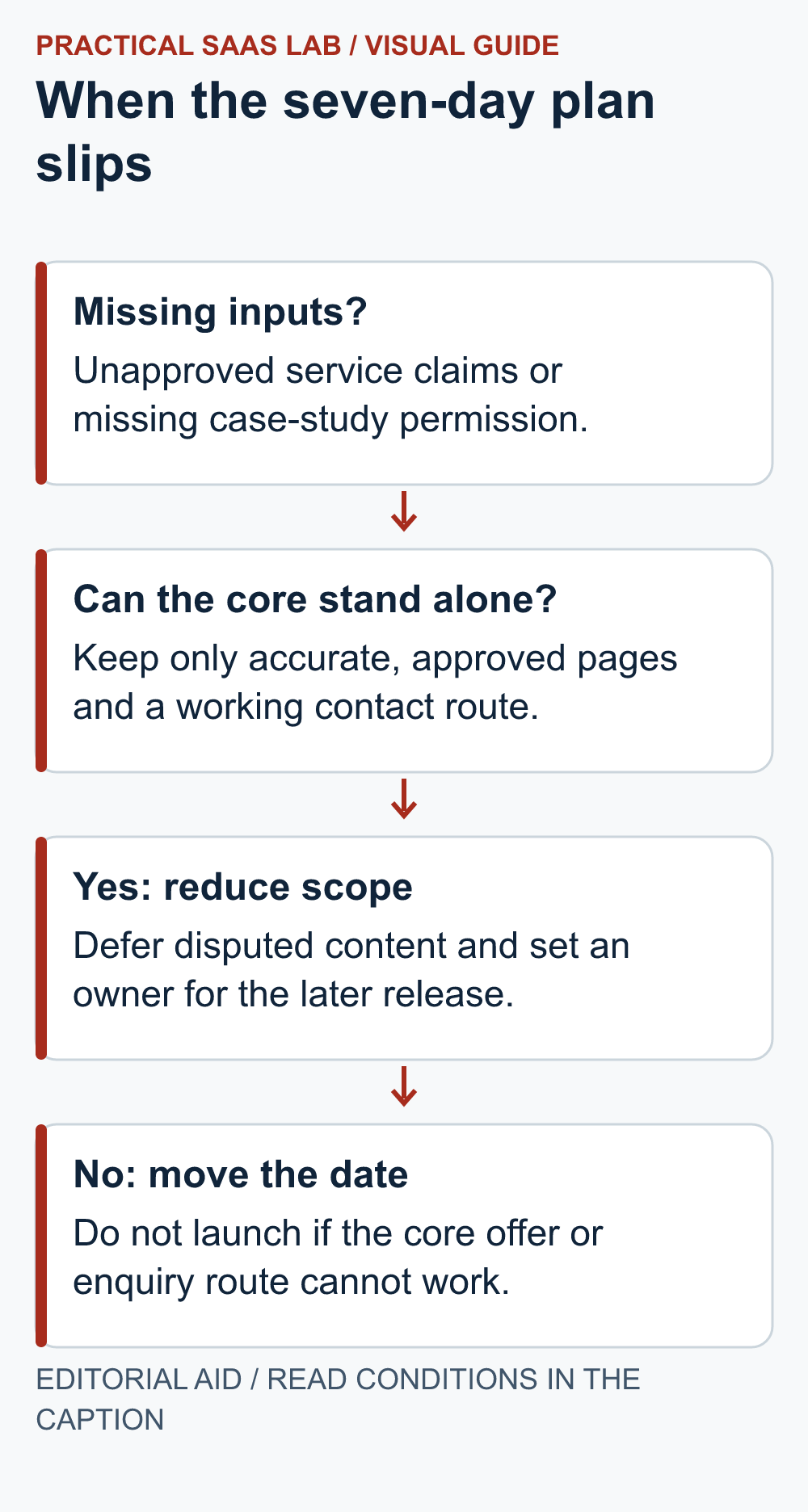
Hypothetical recovery case: By the end of day two, a business has approved its core service description and contact details, but its second service page is still disputed and its case-study permissions are missing. The original five-page plan no longer fits the available inputs.
The owner can approve a smaller launch covering the core service, business identity and a tested contact route, provided that smaller scope is sufficient for the business’s actual requirements. Defer the disputed service and unapproved case study. Remove links to unfinished pages and record their owner and review date. Do not replace missing evidence with invented testimonials or “coming soon” pages that imply a service is available.
Delay instead if the core offer is still unapproved, required information is absent or the enquiry route cannot be verified. Those are launch dependencies, not optional decoration. Keep day six for testing; borrowing the test day to finish copy leaves the riskiest part of the project without a slot.
- Decision owner: one person approves the smaller scope or revised date.
- Deferred work: list the exact page, missing input, responsible person and next review.
- Release condition: the reduced site describes a real offer and passes the same public-page and enquiry checks as the larger plan.
Seven days is a planning constraint, not a reason to publish something nobody can stand behind. The calendar does not answer customer enquiries; the team still has to.
Day 6: prove the customer can reach you
Open the priority service page on a phone and a desktop. Check the menu, main action, text, images, links, contrast and page width. Forms need visible labels and useful error messages; see W3C’s form-label guidance.
Send a labelled test through every live contact route. Confirm that the intended person receives it, can reply, and knows who takes over when absent. Check that confirmation pages reveal no private customer details. If several people handle the queue, the CRM decision guide can help assign follow-up ownership later.
Record URL, device width, action, expected result, actual result and fix owner. A failed form, incorrect contact address, missing privacy notice or lost account access blocks launch until corrected.
Day 7: publish and verify the public pages
Have the owner approve the actual claims and contact details. Publish, then open each intended URL while signed out. Check the page, navigation, contact route, noindex state and canonical URL. Record any mismatch and its owner.
Submit a valid sitemap and inspect priority URLs in Search Console as reports become available. Google’s sitemap guidance says submission helps discovery; it does not guarantee indexing or ranking. Keep enquiry delivery as the immediate operating check.
For the first month, compare actual enquiries and recurring customer questions with the pages you wrote. Fix a confusing service page or broken route before adding more content. Use the keyword research workflow only when a repeated question deserves its own page.
Useful detail: Do not hide a launch preview by only blocking crawling
Google must be able to crawl a page to see its noindex instruction; blocking it in robots.txt is a different control.
Keep the launch visibility decision explicit. Private drafts need appropriate access protection; a public page intended for indexing needs its actual crawl and index controls checked.
Try this:
- Record which pages are private and which are intended to be public.
- Have the maintainer verify the corresponding access and indexing controls.
- At launch, inspect the exact public page and its current directives rather than inferring readiness from the homepage.
Source: Google Search Central: noindex and crawl access. Checked October 3, 2026. The practical check is a PSL suggestion.
FAQ
Can every business launch in seven days?
No. This assumes one approver, accessible assets, a limited page set and a simple contact flow. Legal review, accessibility remediation, booking or payment integration can extend the schedule.
Does publication or a sitemap mean Google has indexed the site?
No. Discovery, crawling and indexing are different steps. Inspect the actual URLs and wait for reports rather than treating a submitted sitemap as search traffic.
Do I need analytics to know whether launch worked?
Verify enquiry delivery and keep a basic enquiry log first. Search Console can later show search impressions and clicks; analytics choices should match your privacy setup and the population you measure.
Primary sources: Google SEO Starter Guide; Google sitemaps; Search Console URL Inspection; W3C form labels; Webflow Site plans. Checked September 26, 2026. Recheck account-specific terms and your own requirements before purchase or publication.
Next step: Put the day-six test in the launch log now and name the person who can postpone publication if it fails.