Quick answer: Tell visitors what they can ask, request the details needed for the next step, explain what happens after sending, and test that the enquiry reaches someone. A customer asking for a quote should not have to complete a small autobiography first.
Jump to: Choose questions · Test delivery · Before publishing
For: consultants, agencies and local service businesses whose website should start a conversation. This guide covers page content and enquiry handling. It does not promise a conversion-rate increase or replace a full accessibility review.
Basis: Form usability guidance is grounded in W3C Web Accessibility Initiative material. The example copy, routing rules and business checks are our recommendations. Examples are fictional; no measured lead-generation results are claimed.

- The five parts of a useful contact page
- Choose questions by the next action
- Example: a small consulting firm’s page
- Make completion and errors easy to understand
- Follow one test enquiry from page to reply
- Do you need a form, email or a booking link?
- Before you call the page finished
- Your next step
- Useful detail: Make the submission result tell the visitor what happened
- Sources and review date
The five parts of a useful contact page
- Purpose: say which enquiries you can help with.
- Necessary details: ask what the next person needs to respond.
- Expectations: explain the next step and realistic response window.
- Alternative: offer an appropriate fallback contact route.
- Ownership: assign the enquiry and verify receipt.
Choose questions by the next action
W3C advises keeping forms focused on information needed for the process. That does not mean every business needs the same three fields. A home-service company may need a service area before it can help; a consultant may need the type of project. Ask a question when its answer changes the next action.
On a small screen, swipe the table sideways to see all columns.
| Question | When it earns its place | When to reconsider it |
|---|---|---|
| Name and reply address | You need to identify and reply to the sender. | A second reply channel is mandatory without a clear reason. |
| Service needed | Different services go to different people. | The visitor must choose from internal department names they do not understand. |
| Location or service area | It determines whether you can provide the service. | You collect a full address before it is needed. |
| Timing | Availability affects the next step. | The visitor must invent an exact date just to ask a question. |
| Budget range | It is needed for a genuine qualification decision. | You do not use it or provide no option for someone still exploring costs. |
| Short message | The customer needs to explain the request. | The instructions encourage unnecessary sensitive detail. |
Need a field-by-field decision? Use the enquiry-form field matrix to separate required, optional, later and unnecessary questions.
For every required field, finish this sentence: “Without this answer, we cannot…” If the honest ending is “fill another column in our spreadsheet,” consider asking later.
Example: a small consulting firm’s page
The copy below is illustrative. Replace the service, coverage and response wording with statements your team can actually support.
Tell us what you need help with
Share the service you are considering and a short description of the problem. If you have a target date, include it; an estimate is fine.
We will review your enquiry and reply with the next step. Our usual response window is [your achievable window, including business days and time zone].
Please do not send passwords, payment details or confidential client files through this form.
Use a specific button label such as “Send enquiry” or “Request a callback.” Choose the label that matches what the action actually does. A callback request should not silently become a newsletter subscription.
Avoid promising an instant personal response unless someone can deliver it. An automatic confirmation can acknowledge receipt; it does not mean a person has reviewed the request.
Make completion and errors easy to understand
Use descriptive labels for each field and make required fields clear. W3C explains how labels should be associated with their controls. Placeholder text alone is a weak substitute for a persistent, clear label.
Give useful correction instructions when something is wrong. “Enter an email address in this format: name@example.com” is more helpful than “Invalid input.” Preserve entered information where possible so the visitor does not have to start again.
After a successful submission, show a clear confirmation and the next step. If a submission fails, show a useful recovery route instead of a success message. Have the implementer verify that feedback also works with assistive technology; a visual check alone is not an accessibility audit.
Test keyboard navigation and the page on a real phone. Can the visitor reach every field and the submit button? Can they understand an error? Can they still see what they are typing? These checks help find problems; they do not certify compliance.
Follow one test enquiry from page to reply
Success message but no email? Use the missing form-email checklist to find the first unverified checkpoint before changing settings.
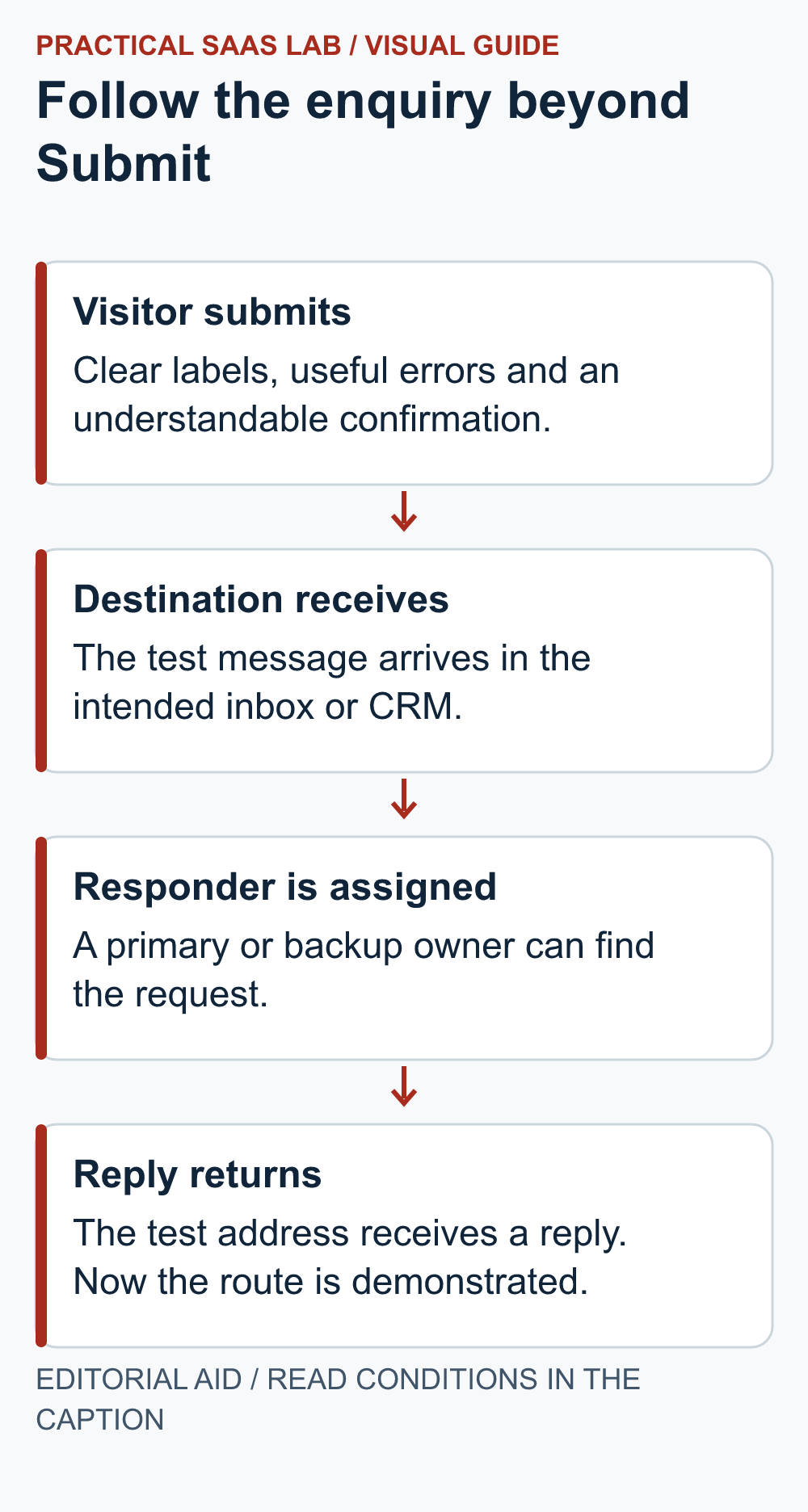
Use one clearly labelled test and a monitored reply address. Follow the same request through four checkpoints:
- Submit: record the time and on-page result.
- Receive: find the same test in the intended inbox or CRM. If missing, check spam or filtering and the delivery route.
- Assign: confirm that the primary or backup responder can find it and knows they own the reply.
- Reply: check that the response reaches the test address.
A success message alone verifies only the first checkpoint.
Record who is responsible when the main responder is absent. A shared inbox with no owner can turn “everyone can see it” into “everyone assumed someone else replied.”
If you have several routes—email, form and booking link—test each one you publish. Keep the number of routes manageable. Three working options are useful only if your team watches all three.
Use a small record with the enquiry time, route, assigned owner, first personal reply and next action. Separate automatic acknowledgements from personal replies. Do not label test messages as real leads.
Do you need a form, email or a booking link?
- Email: start here when a monitored inbox and a clear prompt are enough.
- Form: use a few structured questions when the answers change assignment or the next step.
- Booking link: offer this when the appointment scope and availability are clear.
Each creates operating work: an inbox to monitor, form delivery to verify or a calendar to maintain. Choose the route your team can run reliably. You can add structure when there is a specific problem to solve.
For example, a weekend social DM may sit unseen while your contact page promises a timely reply. If someone watches DMs, give each service request an owner in the same queue as form enquiries; if nobody does, link the profile to a tested form. The social profile link versus DM guide helps make that choice.
A CRM becomes more useful when assignment, follow-up dates or history are slipping. Our HubSpot CRM decision guide includes a two-week comparison worksheet for testing whether it improves those tasks. A new CRM is not required just because the contact page has a form.
Before you call the page finished
- The service and coverage are clear.
- Each required question has a practical reason.
- The response wording matches real staffing and hours.
- The page links to the relevant privacy information.
- Labels, errors and confirmation are understandable.
- A real phone and keyboard-only path have been checked.
- Any photo supports the decision to contact you, and the form remains easy to find on a narrow screen.
- A labelled test was received, assigned and replied to.
- A backup responder and fallback contact route are recorded.
Adding a photo? A genuine team or location image can help explain who the visitor is contacting. Keep contact details as readable text, and avoid letting a large image push the form out of easy reach. The website image checklist covers useful images, crop checks and file size.
If delivery fails, fix that before sending more traffic to the page. A better headline cannot answer an enquiry that never reaches the team.
Your next step
Ask someone unfamiliar with the business to find the right contact route and explain what will happen after sending. Remove a question that does not change the response, then send a labelled test enquiry. Confirm the visible success message, actual delivery, assigned responder and fallback route. If the site is still being built, place this check in the seven-day launch sequence. Once delivery works, use the GA4 measurement guide to keep form clicks separate from received enquiries.
Useful detail: Make the submission result tell the visitor what happened
W3C’s form guidance calls for clear success feedback and error messages that explain how to correct the problem.
The last screen of a contact form is part of the enquiry route. Confirm that a first-time visitor can distinguish a received message from a validation failure without guessing from a button color.
Try this:
- Submit one harmless valid enquiry and read the confirmation text.
- Try one invalid field and follow its correction instruction.
- Check the form retains enough context to finish the task; use a realistic next-step message that the team can actually deliver.
Source: W3C WAI: form submission feedback. Checked October 3, 2026. The practical check is a PSL suggestion.
Sources and review date
- W3C WAI: Forms Tutorial—focused forms and accessible structure.
- W3C WAI: Labeling Controls—labels and control associations.
- W3C WAI: User Notifications—errors, success messages and feedback.
Sources checked September 29, 2026. The examples and checklist are editorial recommendations; adapt them to your service and actual operating capacity.