Quick answer: Use a shared inbox to manage conversations and a CRM when relationships, separate jobs and future actions need structure. Choose the smallest setup that makes the next action and its owner clear.
Jump to: Practical table · Checklist / record
For: small service teams choosing where enquiries should live. This is a vendor-neutral operating comparison, not a hands-on ranking.
Decision gate: Do not add a second system until ownership and the handoff are defined.

- Name the record you need to manage
- Match the work to its simplest useful home
- Worked case: one customer, two separate jobs
- Write the handoff rule before connecting systems
- Give each state a clear owner
- Run a five-case pilot before importing everything
- Compare handling work as well as subscription cost
- Keep access and history practical
- The operating decision card
- Useful detail: Try a simultaneous-reply case
- Sources and editorial basis
Name the record you need to manage
A shared inbox organises conversations. A CRM organises relationships and pieces of business work. Products can overlap, so choose by the missing operational capability rather than the category name. First count the work units your team must distinguish: conversations, customers, separate jobs, or scheduled follow-ups. A single email thread is a poor substitute for two separately owned jobs, while a pipeline adds little when every request is resolved in one reply. If the problem is simply that two colleagues reply to the same email, a full sales pipeline may be more machinery than you need.
If the customer has several open proposals, each with its own owner and next step, a single email thread may be too small a record. Conversely, adding stages and required fields to a two-message request can create administration without improving the response. Start by tracing one normal request and one awkward one.
Write the record boundary before connecting tools
- Conversation: the actual email, chat or call history.
- Contact: the person and approved contact routes.
- Job: one proposal, enquiry or piece of work with its own stage and owner.
- Next action: the named commitment and due date for that job.
Document the meaning, object, allowed format and update owner for fields shared between systems. The CRM data dictionary guide provides a copyable record. This prevents an inbox tag called “won” and a CRM stage called “closed” from quietly describing different things.
Match the work to its simplest useful home
On a small screen, swipe the table sideways to see all columns.
| Operational need | Starting route | Acceptance question |
|---|---|---|
| Mostly short email conversations | Shared inbox with ownership | Can colleagues see who is responding and what remains open? |
| Several follow-up stages and proposals | CRM with an explicit next action | Can a backup find the current commitment and due date? |
| One customer, multiple separate jobs | Linked customer and enquiry records | Can each job progress without overwriting the others? |
| Support conversations plus sales pipeline | Defined connection between systems | Which system owns each status and who resolves mismatches? |
| Tiny volume and no missed work | Improve the existing routine first | Does a simple owner-and-due-date rule solve the actual problem? |
This is a workflow distinction, not a feature claim about every inbox or CRM. Check the chosen product’s actual assignment, record-linking, permissions and export behaviour. A label on the pricing page does not tell you how the team will handle a second enquiry from the same person.
Worked case: one customer, two separate jobs
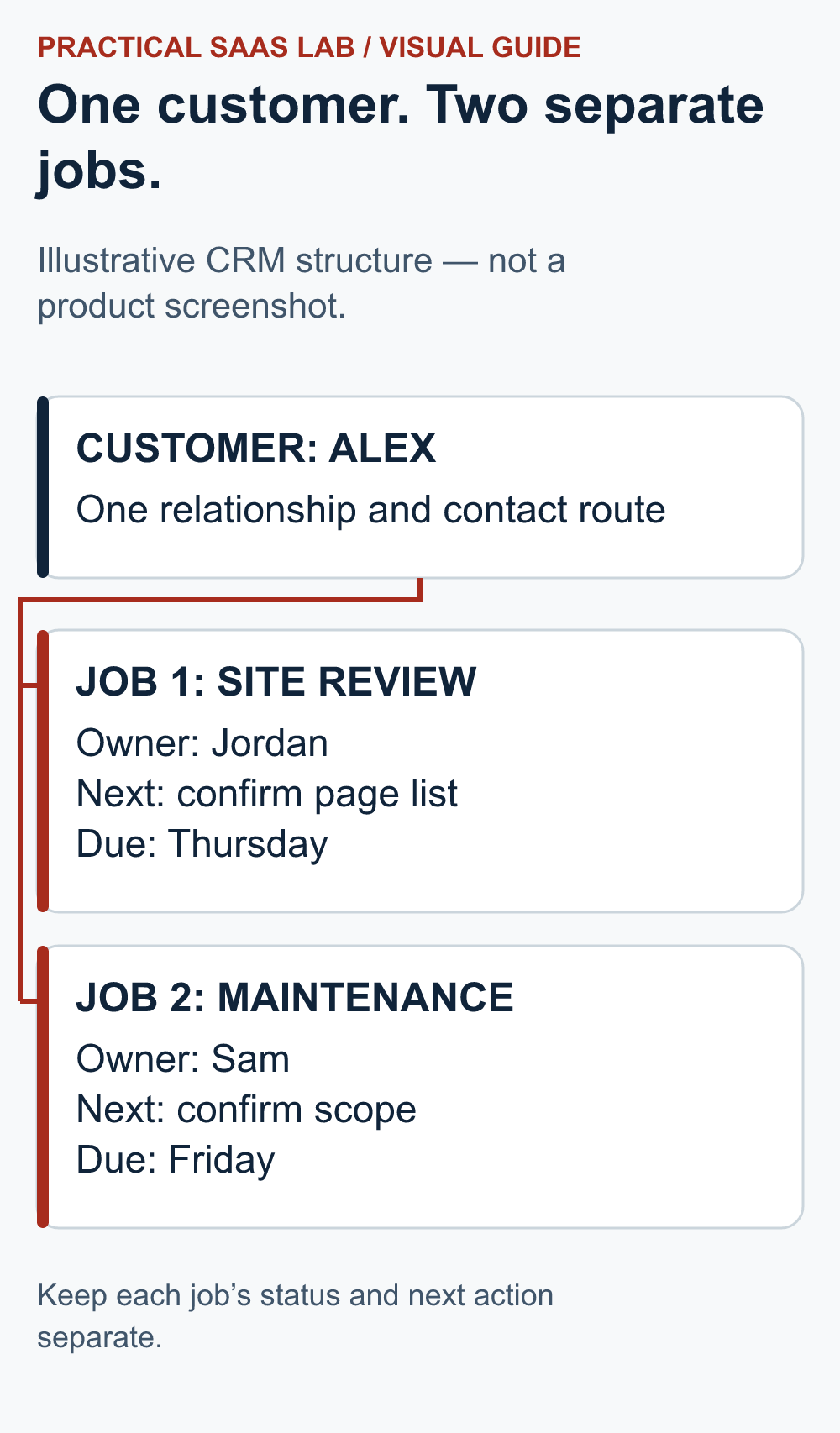
Hypothetical agency: Alex asks about a website review. A colleague also discusses a separate maintenance project with Alex. One email address now relates to two possible jobs. If staff use one contact-level status, marking the review “won” could make the maintenance request appear resolved when it is still awaiting scope.
A useful structure is one appropriate customer record linked to two enquiry or opportunity records, each with its own scope, owner, stage and next action. Keep the conversations linked where the system supports it. The email identifies a contact route; it does not uniquely identify the piece of work.
For the review, the next action might be “Jordan sends the agreed page list by Thursday”. For maintenance, it might be “Sam confirms which updates are included before preparing a proposal”. Those are separate commitments even though the customer is the same. Use invented names or authorised test data when rehearsing the setup.
Write the handoff rule before connecting systems
Decide the moment an inbox conversation becomes a CRM record. For example, create a separate opportunity only after scope and next action are known; keep general questions in the inbox. Choose who creates the record, which conversation link it carries, and what happens if the customer replies to the old thread after the job is closed.
Illustrative edge case: Alex asks for a website review and later replies to the same thread about maintenance. The responder keeps one contact, opens a second job with its own owner and due date, and links both to the conversation. They do not overwrite the review stage with a maintenance status. If the tools cannot represent that split clearly, the team should use a simpler manual handoff until the record design is fixed.
Give each state a clear owner
Choose one authoritative place for the next action. If staff update both an inbox tag and a CRM stage manually, decide what happens when they disagree. Document which state wins, who resolves the mismatch, and whether a closed thread can reopen a job. In a combined workflow, the inbox may hold the conversation while the CRM holds the open opportunity and due task. That is a proposed operating arrangement, not automatic synchronisation.
Name the primary operator and the backup. State when an unassigned conversation is escalated and how ownership changes during absence. An assignment is not complete until the new owner can locate the message and understand the next step without asking the absent colleague.
Run a five-case pilot before importing everything
- New enquiry: create one request, assign an owner and record the next action.
- Reply by another colleague: confirm the first owner can see what was sent and avoid a second answer.
- Second job from the same customer: retain the shared relationship but keep the two scopes and due dates separate.
- Owner unavailable: have the backup find the context and take the next action using ordinary permissions.
- Closed request reopened: decide whether it resumes the old job or starts a distinct one; preserve the history.
Record pass, fail and not tested separately. Use the normal operator, not only the person configuring the system. If the test relies on administrator access or a feature outside the proposed plan, it has not demonstrated the intended daily workflow.
Compare handling work as well as subscription cost
Suppose an invented pilot has 40 enquiries a month. Maintaining duplicate status in two systems takes two extra minutes per enquiry: 80 minutes monthly. A proposed connection takes four hours to set up and still requires 30 minutes of checking monthly. It would release 50 minutes a month before maintenance and exception work.
The simple time-only payback is 240 ÷ 50 = 4.8 months under those assumptions. Add any subscription cost and test whether the connection handles replies, reopened work and missed events. Do not automate an unclear ownership rule just to save two minutes of entering an unclear status.
If volume is ten enquiries instead, the same duplicate entry takes only 20 minutes, less than the assumed 30 minutes of supervision. That does not rule out integration for reliability, but it removes the claimed time saving. Keep reliability and saved time as separate reasons, each with evidence.
Keep access and history practical
Give staff only the access their job requires through the product’s supported controls. Do not share one owner password as a substitute for assignment. Check whether the backup can see needed attachments and earlier messages without exposing unrelated work. Keep customer information out of unrestricted test sheets.
Before retiring the old route, verify how open work and necessary history remain accessible. Exported contacts alone may omit the conversations or files the operator needs. Use a controlled handover and keep a dated list of requests handled during the transition so nobody replies twice.
The operating decision card
Types of incoming request:
Conversation home:
Customer and job records required:
Authoritative next-action location:
Primary owner, backup and escalation rule:
Five pilot cases and actual outcomes:
Handling time, subscription cost and supervision:
History and export checks:
Decision: existing route / inbox / CRM / defined combination:
Unresolved limitation and review date:
Keep the existing route when ownership rules solve the problem reliably. Add a CRM when distinct jobs, commitments and follow-up need structured records. Combine tools only when each has a clear job and the handoff has passed the awkward cases. Two systems should not mean two versions of the truth.
Useful detail: Try a simultaneous-reply case
Help Scout’s collision detection can stop a reply when a conversation has new updates that the writer has not seen.
If duplicate replies are your main shared-inbox problem, rehearse that exact case rather than only checking that two people can log in. The protection still belongs inside a clear ownership process.
Try this:
- Open a disposable conversation with two authorized users.
- Have one user add a note or reply while the other is drafting.
- Observe the warning and recovery behavior, then record how the team decides who finishes the response.
Source: Help Scout: collision detection. Checked October 3, 2026. The practical check is a PSL suggestion.
Sources and editorial basis
Original Practical SaaS Lab operating framework. Examples and time assumptions are invented; verify required features in the actual products and account plans. Reviewed September 29, 2026. The workflow and examples are editorial proposals, not measured customer results.
Keep going: Define follow-up ownership · Plan a CRM migration
If the missing work belongs in a support queue rather than a sales pipeline, use our Freshdesk vs Help Scout guide. Choose by message ownership and recovery, not the longest feature list.
If a shared inbox fits the job and your team already uses Google or Microsoft, use our Google Collaborative Inbox vs Microsoft Shared Mailbox guide. Check who can receive, assign and finish the same enquiry.