Quick answer: Define the business outcome, map the supporting events, and test the complete journey into the destination system. A contact-button click is a useful clue, but it has not yet booked the job.
Jump to: What each signal proves · Measurement acceptance card
For: service businesses reviewing an existing or planned GA4 implementation. This is an acceptance checklist, not a tag-installation tutorial or privacy-law assessment.
Decision gate: Do not label a click as an enquiry unless the defined enquiry outcome is verified.

- Name the outcome before the event
- Map each signal to what it really proves
- Write a small measurement specification
- Test one complete journey and its failure cases
- A worked example: three totals that should not be merged
- Review gaps without inventing missing conversions
- Use the result to fix a specific problem
- The measurement acceptance card
- Useful detail: Test a data filter before permanently excluding traffic
- Sources and editorial basis
- Choose the next step
Name the outcome before the event
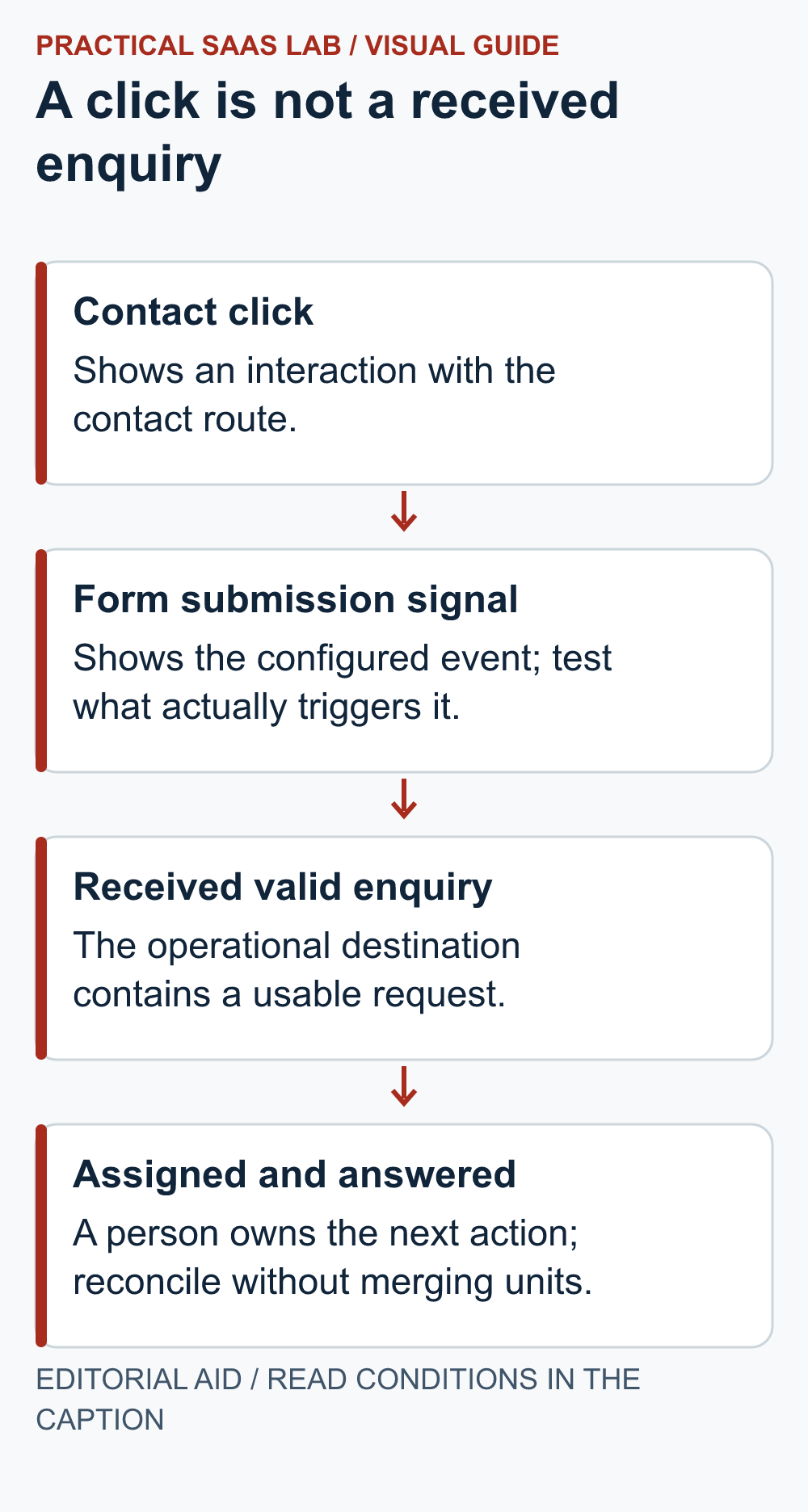
Begin with a business sentence: “A valid enquiry reaches the team with enough information to reply.” Then work backwards to observable steps: a visitor selects a contact route, submits information, receives confirmation, and the team receives a record. A click is one step in that path. It is not automatically a lead.
An event is a recorded interaction in analytics. It can be useful without being a business outcome. Keep the names distinct in your reporting so a button click does not quietly become a sale when copied into a management sheet. Write the definition beside the report so a later reader can tell which step was counted.
Map each signal to what it really proves
On a small screen, swipe the table sideways to see all columns.
| Signal | What it can indicate | What still needs checking |
|---|---|---|
| Contact link click | Someone selected a contact route | Whether they completed a request. |
| Form interaction event | The browser recorded a form interaction | Whether the request was accepted and delivered. |
| Confirmed enquiry record | The destination received a request | Whether it is valid, unique and suitable. |
| Qualified opportunity | The team accepted a genuine service opportunity | Whether it becomes paid work. |
| Won job or payment | A defined business result | Refunds, cancellations and accounting treatment where relevant. |
Google’s enhanced measurement documentation describes automatic interactions such as outbound-link clicks and form events when enabled. Outbound click measurement covers links leaving the current domain, with an exception for domains configured for cross-domain measurement. Your own booking and form journey still needs testing; do not infer its coverage from the feature name.
Write a small measurement specification
For each important action, record the page, control, expected event, firing condition and expected destination outcome. Add the consent state in which it is permitted to run. Keep your approved consent policy; this article does not tell you to enable tracking for every visitor or change regional settings.
Use stable, non-personal labels such as a service category or button location where appropriate. Do not place names, email addresses or message text in event names, parameters or URLs. Have the implementation reviewed against the platform’s current data requirements before releasing it.
Start with a few decisions you will actually use. If you cannot say what you would change when a metric rises or falls, the event may not deserve immediate implementation. A smaller set of understood signals is easier to maintain when the site changes.
Test one complete journey and its failure cases
- Use authorised fictional data and a clearly marked test request.
- Open the real public page in the intended browser and consent state.
- Perform one action and check the relevant analytics test view with your implementer.
- Confirm that the expected destination record exists and the owner receives it.
- Repeat with a validation error, a retry and a refreshed confirmation page.
- Check that each result is labelled correctly and duplicates are understood.
If a validation error records a form event, treat it as an attempt until the destination confirms receipt. If refreshing the confirmation page records another view, reconcile it to the original enquiry rather than counting a second lead. The thank-you page versus form event guide shows how to choose and test the counting point.
Also test the intended behaviour when analytics consent is absent or declined. An enquiry process may still need to function even when analytics is unavailable; follow your actual design and policy. Mark unobserved analytics as unobserved rather than claiming no one used the form.
Keep technical event testing separate from a live business report. Exclude or identify your own test activity using the approved setup. Do not casually change production filters while trying to make one test appear; ask the person responsible for analytics to explain the effect first.
A worked example: three totals that should not be merged
Illustrative test: follow one visitor through these steps, keeping each unit separate.
- The visitor clicks the contact button twice.
- They submit the form once.
- They refresh the confirmation page.
- The team receives one valid enquiry.
Depending on the implementation, analytics may record several interactions. Verify what fires at each step. Multiple event records do not establish multiple customers or enquiries.
Write the acceptance condition as “one accepted enquiry in the destination, with the expected supporting events and no unexplained duplicate outcome.” Do not force every report to show the same total. Events, users, sessions and destination records are different units. First explain the mapping, then decide which count answers the business question.
Review gaps without inventing missing conversions
For an agreed period, compare permitted analytics signals with the operational enquiry register. Record time zones, filters, spam exclusions and when each record was created. A gap is a reason to investigate; it is not evidence that analytics or the form is definitely broken.
Consent choices, browser behaviour, different devices and an external booking service can affect what you observe. Do not calculate a universal correction factor from a handful of test cases. Report the measured total and the known coverage limitation separately.
Use the result to fix a specific problem
If contact clicks occur but valid requests do not arrive, inspect the form journey and delivery evidence before rewriting the offer. If valid requests arrive but no one responds, fix ownership and follow-up. If the journey works but few suitable requests arrive, compare the page’s service and coverage answer with the enquiries you actually receive. A visitor outside your real area may submit a valid form but still be a poor-fit request; the service-area page guide helps make that boundary clear. Better measurement alone will not create demand.
When a page or form changes, rerun the relevant cases. Assign someone to maintain the measurement specification. “It worked when we installed it” is history, not a current acceptance test.
The measurement acceptance card
Business outcome and reporting unit:
Page and action tested:
Expected event and firing condition:
Consent state and approved behaviour:
Destination record, responsible person and service-fit decision:
Normal / error / retry / refresh results:
Duplicate or missing signals explained:
Test activity handling:
Release decision, owner and next retest:
Useful detail: Test a data filter before permanently excluding traffic
GA4 active data filters permanently exclude matching incoming data and do not change historical data.
Use the documented testing state when validating an operator-traffic rule. Keep a written test plan so an incorrect rule does not silently remove genuine visitor data.
Try this:
- Identify the intended test traffic and filter condition.
- Validate the testing-state result with a controlled visit.
- Activate only after the responsible owner accepts the match behavior; do not expect excluded data to be recoverable later.
Source: Google Analytics: data filters. Checked October 3, 2026. The practical check is a PSL suggestion.
Sources and editorial basis
Event behaviour: Google Analytics enhanced measurement events. Implementation, consent and destination checks are site-specific. Reviewed September 29, 2026. The workflow and examples are editorial proposals, not measured customer results.
Keep going: Test the contact page itself · Handle duplicate and failed automation runs
Choose the next step
Once event measurement is clear, use consistent campaign labels to distinguish external links. UTM Naming for Small Businesses: Track Campaign Links Without a Mess.