Quick verdict: Consider HubSpot when enquiries pass between people and follow-ups get lost. If one owner can reliably manage every next step in a spreadsheet, don’t rush to replace it. A new CRM won’t answer the customer everyone thought someone else had replied to. Test both systems with the same three cases before paying for more software.
Start here: Get the free CRM comparison worksheet (Excel) or use the browser version. Includes ten fictional records and tests for an absent owner, a repeat enquiry and an overdue quote.
About this guide: Based on official documentation, not a hands-on HubSpot test. Product details were checked September 27, 2026.

- Who should use HubSpot, and who should wait?
- The workflow that matters more than a feature list
- What the free starting point can and cannot tell you
- Estimate the real operating cost
- HubSpot versus a spreadsheet or another CRM
- A two-week decision test
- Three cases to run before choosing a CRM
- Test stage rules before choosing a CRM
- Useful detail: Rename the label without losing the integration identity
- FAQ
- Choose the next step
Who should use HubSpot, and who should wait?
On smaller screens, scroll the table horizontally to compare all three columns.
| Situation | Starting choice | Why |
|---|---|---|
| One owner, few leads, no hand-off | Structured spreadsheet | It can track an owner, stage and next date without adding another system. |
| Several enquiry sources or staff hand-offs | Test HubSpot free tools | Shared contact and deal records make the follow-up visible. |
| Regular campaigns, segmentation or automation | Cost the paid workflow first | Marketing contacts, email volume, seats and feature gates affect the real bill. |
| Strict data, integration or reporting requirements | Pilot against a written checklist | Permissions, exports, consent and integrations need account-level verification. |
HubSpot’s CRM overview presents contact, deal and task management as part of its free entry point. That is enough to test whether the team consistently records a lead and its next step. It does not prove that every later marketing or reporting need is included in the free tier.
The workflow that matters more than a feature list
Define the smallest field set before the pilot
Before creating custom properties, write one line for each field the pilot depends on: what it means, which record it belongs to, who updates it, its allowed format and what a blank means. For this workflow, start with enquiry reference, owner, stage, next action and due date. Keep contact details on the contact and job-level progress on the deal or enquiry record.
- Definition: two colleagues should choose the same value from the same facts.
- Owner: name the person or process responsible for keeping it current.
- Consumer: name the queue, report or hand-off that actually uses it.
Use the CRM data dictionary guide to document the fields before importing or automating them. A property that nobody can define will not become clearer because it has a dropdown.
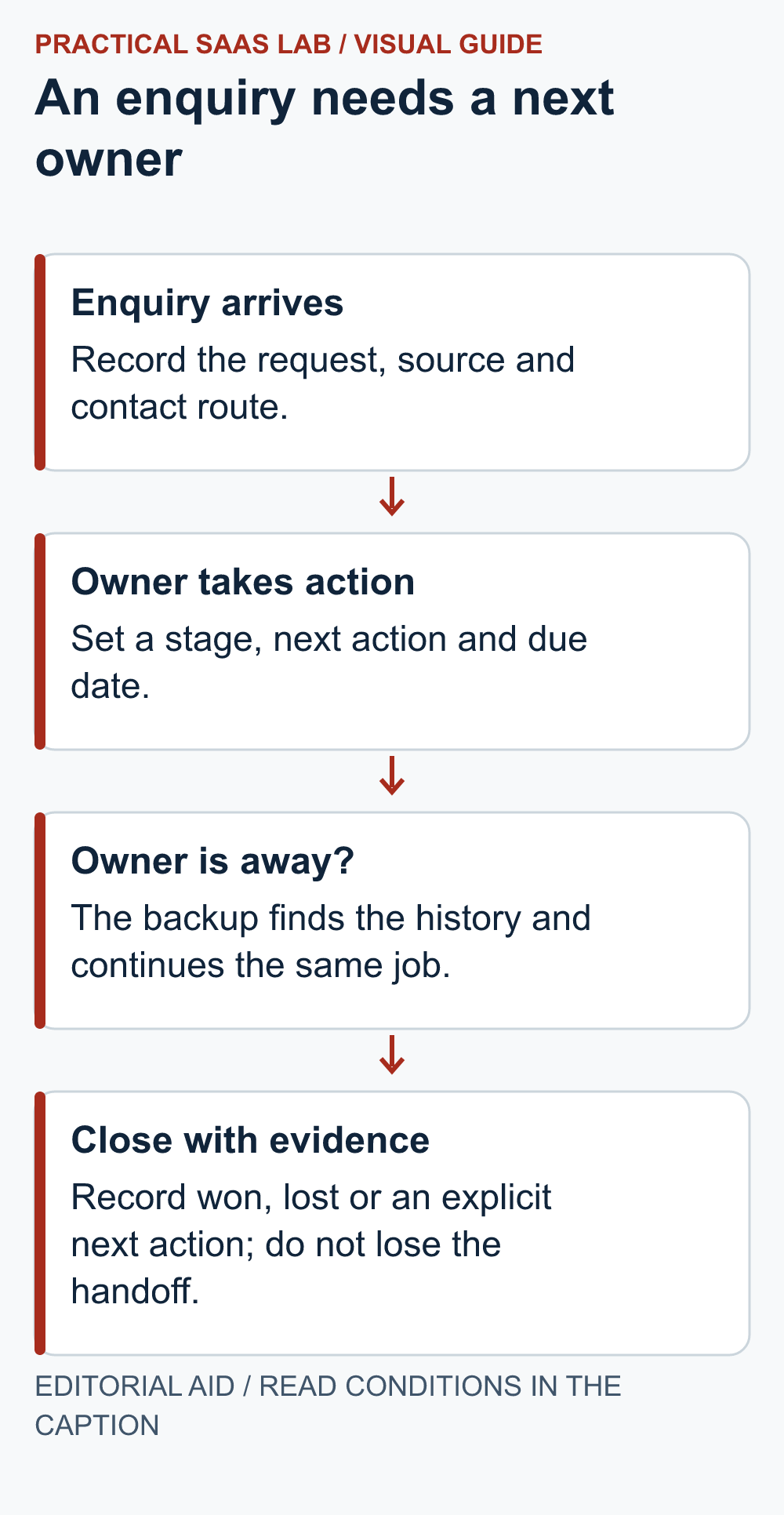
Before you choose software, map what happens from the first enquiry to a won or lost job. Keep the basics visible: source, contact details, service requested, owner, stage, next action and due date. Then ask what happens when that owner is away. If the answer is “we’ll ask them when they’re back,” you have a hand-off problem to solve. Someone still needs to update the record after each call, quote or reply.
- Capture: Decide whether the website form should create a contact directly or send a notification for manual review. HubSpot documents how to embed a form on an external site. Test the form on the real domain, including spam handling, delivery, consent text and mobile display.
- Qualify: Use a few meaningful stages rather than a long sales pipeline. A stage should tell a colleague what has happened and what happens next.
- Follow up: Assign a person and date. Review overdue actions weekly. Compare missed follow-ups and response time with the old process.
- Close or archive: Mark the outcome and reason. Keep a clear policy for records you no longer need.
If your website itself is still being built, start with the seven-day launch checklist. Confirm that a test enquiry reaches the owner before connecting more software. A sophisticated CRM does not rescue a broken contact form.
What the free starting point can and cannot tell you
HubSpot describes its free CRM as an ongoing free product rather than a short trial. Its current free-tools comparison lists limits alongside paid tiers. Check that page in your target country and account before deciding on users, records, email sending, branding or automation. Do not rely on a search snippet: product pages can describe different contact types or editions in different ways.
The key distinction for a growing business is between storing a contact and using HubSpot’s marketing tools to engage that contact. HubSpot’s marketing-contact explanation says that a Marketing Hub subscription selects a tier for the contacts engaged through marketing tools, while its billing guide explains the related cost mechanics.
Review the status that forms and other tools assign to new contacts before importing a list or starting campaigns. The number of people in a CRM is not the same budget question as the number receiving marketing activity.
Estimate the real operating cost
Use a monthly and annual worksheet, even if the first month is free. Record the edition, required seats, expected marketing-contact tier, email volume, integrations, implementation help and the staff time needed to clean data. Include any future step that your written workflow actually requires. HubSpot’s pricing page is the source for current plans and billing terms; promotional prices, billing period and contact tiers can change.
A paid upgrade is justified when a measured bottleneck has an owner and the specific feature removes that bottleneck. For example, if manual routing repeatedly delays replies, test the routing workflow in the relevant plan and compare the time saved with the full incremental cost. Avoid buying an automation tier for an untested funnel.
HubSpot versus a spreadsheet or another CRM
A shared spreadsheet wins on speed and portability for a very small pipeline. It starts to fail when versions diverge, private notes mix with shared data or follow-ups depend on one person’s memory. HubSpot gives the team a common record and a route toward forms, email and sales tools, but that also makes process design and later pricing more important.
Another CRM may fit better if your team needs a narrower sales workflow, different integrations, or a lower cost at its expected scale. Compare those needs in a real trial using the same ten sample records and three follow-up cases; do not compare only marketing feature lists.
Before committing, check how to move your data. HubSpot documents record exports and broader content and data export. Export a test set and inspect fields, activity history and any assets you would need elsewhere. Exportability does not mean every workflow can be recreated automatically in a different CRM.
A two-week decision test
- Write the six or seven fields needed to answer “who follows up, on what, and when?”
- Import or create a small set of permitted test records. Avoid real personal data in an exploratory account unless your privacy process covers it.
- Run one enquiry from the live form through assignment, response, quotation and closure. Test what happens if the assigned person is away.
- Each week, count unassigned leads, overdue follow-ups, duplicate records and time spent on data entry.
- Price the plan that supports the workflow you actually used. Recheck permissions, marketing-contact defaults and export before committing.
Free comparison worksheet: Download the two-week CRM pilot worksheet (Excel, 10 KB). Record spreadsheet and CRM results side by side, run the three cases below, and use the included fictional sample records. This is a blank testing template, not a report of measured HubSpot results. Use the browser worksheet below if you prefer to work without a download.
Browser worksheet: compare the same two-week workload
If the Excel download does not open, copy this table into your own document or spreadsheet. Choose the same sample records, test period and pass conditions for both options. Fill in observed results; blank cells are not zeroes.
On a small screen, swipe the table sideways to see all columns.
| Check | Spreadsheet result | CRM result | Pass condition agreed before testing |
|---|---|---|---|
| Unassigned enquiries at review | Record count | Record count | Write your limit |
| Follow-ups past the agreed due date | Record count | Record count | Write your limit |
| Duplicate records found | Record count | Record count | Write your limit |
| Data-entry and administration time | Record minutes | Record minutes | Write your time budget |
| Owner absent: backup person can continue | Pass / fail + evidence | Pass / fail + evidence | Define the required hand-off |
| Sample export preserves required fields | Pass / fail + missing items | Pass / fail + missing items | List the fields you must keep |
Decision note: record what failed, who will fix it and whether the extra operating work is justified. This is a simplified blank worksheet, not a set of tested product results.
Three cases to run before choosing a CRM
These are suggested tests for your own team, not results from a hands-on HubSpot trial. Use the same ten fictional sample records in your spreadsheet and the CRM you are evaluating. Agree on a response deadline and an acceptable amount of administration before you start. Manual steps count: record them instead of assuming that a free plan will automate the work.
1. The enquiry owner is unavailable
- Do: Create a test enquiry, assign an owner and ask a colleague to take over using only the shared record.
- Check: Can they find the customer request, previous actions, next action and due date?
- Pass: A named replacement can respond within the agreed deadline without the original owner’s private notes.
- Record: Hand-off time and any missing context.
2. The same person enquires again
- Do: Submit two fictional enquiries with the same test email and different service requests.
- Check: Inspect what the actual form and import workflow creates; do not assume automatic deduplication.
- Pass: Both requests remain understandable, neither is lost, and each has a clear next owner and action without conflicting outreach.
- Record: Any manual review or merging time.
3. A quote is waiting for a reply
- Do: Record a quote, follow-up owner and due date. Leave one test action overdue for a colleague to find.
- Pass: The overdue action is visible and can be reassigned or rescheduled with a reason.
- Record: Any paid-plan requirement for reminders or routing. Untested features do not count as demonstrated benefits.
For each case, record the result, minutes spent, manual workarounds, and any plan limitation. At the end of two weeks, compare unassigned enquiries, overdue actions, conflicting duplicate outreach, and total administration time with the spreadsheet process. If there are too few real enquiries to judge an improvement, treat this as a workflow check and continue observing before upgrading.
Decision rule: Keep the simpler option if both systems pass and the CRM adds work without solving a recurring problem. Continue the CRM pilot if it makes hand-offs more reliable at an acceptable operating cost. Consider a paid feature only after testing the specific bottleneck it is meant to remove. A failed test is a reason to adjust the workflow or compare another tool, not an automatic reason to buy a higher tier.
Recommendation: If the free workflow reduces missed hand-offs and the team keeps records current, keep using it while the process is small. If the paid features solve a repeated, measured problem at an acceptable total cost, trial that specific tier. If the team will not maintain the data, simplify the process first. Review HubSpot’s current CRM and free-tools details before signing up.
Test stage rules before choosing a CRM
A polished pipeline board is useful only if the team can define and enforce what moves a record. During a trial, create three fictional deals and test a normal advance, a backward move and a pause. Check whether ordinary users can see the required fields, next action and reason without administrator access. Then read the CRM stage exit criteria guide and compare the product’s behaviour with the team’s operating rule.
- Move a qualified deal to Proposal only after the agreed evidence exists.
- Return one deal to Qualified and confirm the reason and history remain visible.
- Pause one deal with an owner and review date; verify that it does not quietly disappear from active work.
Useful detail: Rename the label without losing the integration identity
HubSpot lets you change a property label, while its internal name remains fixed after creation.
During a CRM pilot, keep a short label-to-internal-name map for the fields that forms and automations write. This lets you improve the colleague-facing wording without confusing it with a new field.
Try this:
- Choose one custom field used in the harmless pilot.
- Record its label and internal name.
- After a permitted label change, check that the intended form or mapping still reaches that same field.
Source: HubSpot: property editor and internal names. Checked October 3, 2026. The practical check is a PSL suggestion.
FAQ
Is HubSpot free forever?
HubSpot markets an ongoing free CRM, but the included limits and paid features need checking on its current pricing page. A free CRM record and a paid marketing-contact tier address different uses.
Do I need a CRM before launching my website?
No. A reliable contact route, named owner and follow-up log come first. Add a CRM when the volume or hand-offs make that log hard to maintain.
Can I export my contacts later?
HubSpot provides record export instructions. Test the data you would need, including properties and activity history, before assuming migration will be complete.
Primary sources: HubSpot CRM; HubSpot pricing; marketing contacts; billing; external-site forms; record export. Checked September 27, 2026. Product terms and account availability should be confirmed before purchase.
Choose the next step
If the team loses ownership before a deal exists, compare a shared inbox with a CRM. If a shared record solves the problem, use the spreadsheet-to-CRM cutover guide and the two-week worksheet above. If you need to compare a focused paid pipeline with HubSpot, run the same sample follow-up in our Pipedrive vs HubSpot decision guide.
If your shortlist includes Zoho alongside a focused sales pipeline, use our Zoho CRM vs Pipedrive guide. Apply the same routing and follow-up checks to each candidate.